Sunday, February 10, 2013

Google Adds Over 1,000 Emoticons To Gmail’s New Compose[Updates]

1

Gmail new compose ကို သံုးေနျပီလား?သင္သတိထားမိရင္ gmail new compose က emoticon ကို ႏွိပ္ရင္ “coming soon” ဆိုတဲ ့message ကိုေတြ ့ျမင္ရမွာပါ။အခုေတာ့ gmail new compose မွာ emoticon ကို သံုးလို ့ရပါျပီ။အဲဒီအတြက္ သင့္သူငယ္ခ်င္း၊မိတ္ေဆြ ေတြဆီကို emoticon ေလးေတြ သံုးျပီး ေမး ပို ့ႏိုင္ပါျပီ။အရင္ old compose မွာေတာ့ emoticon အနည္းငယ္သာရွိျပီး new compose မွာ emoticon 1000 ေက်ာ္ထပ္ျဖည့္ထားပါတယ္။

Saturday, February 9, 2013

How To Remove All Modern Applications From Windows 8

1

Windows 8 မွာ နဂို ပါရွိလာတဲ့ Modern or Metro applications ေတြကို ေတြ ့ျမင္ႏိုင္ပါတယ္။အဲဒီ applications ေတြ ဟာ touch screen device ေတြအတြက္ ရည္ရြယ္ျပီး ျပဳလုပ္ထားတာပါ။သင္ဟာ touch screen device ေတြကို အသံုးျပဳသူမဟုတ္ရင္ အဲဒီ applications ေတြအားလံုးကို တစ္ျပိဳင္နက္တည္း ျဖဳတ္ ႏိုင္ပါတယ္။Windows Store ကိုေတာ့ျဖဳတ္လို ့မရပါဘူး။အဲဒီအတြက္  ျဖဳတ္လိုက္တဲ့ modern apps   ေတြကို သင္ေနာက္ပိုင္းမွာျပန္အသံုးျပဳခ်င္ရင္  Windows Store ကေနျပန္ျပီးအင္စေတာလုပ္ႏိုင္ပါတယ္။Application တစ္ခုခ်င္းစီ ကို ပဲသီးသန္ ့ျဖဳတ္ခ်င္ရင္ေတာ့ Customize The Windows 8 Start Screen ဆိုတဲ့ ေဆာင္းပါးကိုဖတ္ပါ။

Thursday, February 7, 2013

Control YouTube & Vimeo Playback In Chrome From IOS Or Android[ Chrome Extension ]

7

သင့္ရဲ  ့ android နဲ ့ ios  device ေတြကို  remote control လို အသံုးျပဳျပီးသင့္ကြန္ျပဴတာ ရဲ  ့ chrome browser ကေန ၾကည့္ရွုေနတဲ့ YouTube & Vimeo က video ေတြကို ထိန္းခ်ဳပ္ႏိုင္ပါတယ္။Volume အတိုးအေလွ်ာ့ ျပဳလုပ္ႏုိင္ျပီး အဲဒီ channel က video ေတြကို next/previous ၾကည့္ႏိုင္ပါတယ္။Rewind ,fast-forward ျပဳလုပ္ႏိုင္ပါတယ္။Search bar လည္းပါရွိျပီး video ေတြြကိုရွာေဖြၾကည့္ရွုႏိုင္ပါတယ္။ဒီလုိၾကည့္ရွုႏိုင္ဖို ့အတြက္ android or ios device ေတြအတြက္ de mobo application ကို အင္စေတာ့လုပ္ရမွာျဖစ္ျပီး သင့္ကြန္ျပဴတာက chrome browser မွာေတာ့ YouTube Couch Mode ဆိုတဲ့ Extension ကို အင္စေတာလုပ္ရမွာျဖစ္ပါတယ္။YouTube,Vimeo အျပင္ တစ္ျခား web sites ေတြျဖစ္တဲ့ pandora,grooveshark,google dos,slideshare,last.fm,scribd စတာေတြကို ပါ ios or android device ကေန ထိန္းခ်ဳပ္ ၾကည့္ရွုႏိုင္ပါတယ္။

Wednesday, February 6, 2013

Save Web Pages,Audio,Video & Files To Google Drive [Chrome Extension]

1

သင့္မွာ  google အ ေကာင့္ တစ္ခု  ရွိ ရင္  Google Drive    ဆိုတဲ့  cloud service ကို အသံုးျပဳျပီးသင့္ဖိုင္ေတြကို အင္တာနက္ေပၚမွာသိမ္းထားလို ့ရျပီး ေနရာတိုင္းမွာသင့္ဖိုင္ေတြကိုအသံုးျပဳလို ့ရပါတယ္။ဒါ့အျပင္ ဖိုင္ေတြကို ျပန္လည္ေ၀မွ်လို ့လည္းရပါတယ္။သင္ဟာ google chrome အသံုးျပဳသူတစ္ေယာက္ဆိုရင္ Save To Google Drive ဆိုတဲ့ google ရဲ ့ official  extension ကို သံုးျပီး အင္တာနက္က web pages ေတြ ဖိုင္ေတြကို သင့္ရဲ  ့ google drive ကို တိုက္ရိုက္သိမ္းလို ့ရပါတယ္။အဲဒီအတြက္ download & upload လုပ္စရာမလိုဘဲ အခ်ိန္ကုန္သက္သာေစပါတယ္။

StudioLine Web 3.70.54.0 With Serial

1

Web designer software တစ္ခုပါ။Programming မတတ္ဘဲနဲ ့၀က္ဆို္က္ေတြအလြယ္တကူျပဳလုပ္ႏိုင္ပါတယ္။အသင့္ပါရွိျပီးသား design template ေတြပါရွိျပီး စိတ္ၾကိဳက္ျပဳျပင္ႏိုင္ပါတယ္။ျပဳလုပ္ျပီးတဲ့ ၀က္ဆိုက္ေတြကို IE,Chrome,Firefox,Opera,Safari စတဲ့ browser ေတြနဲ ့preview ၾကည့္ႏိုင္ပါတယ္။Windows® 8 / 7 / Vista / XP SP3 စတဲ့ OS ေတြမွာသံုးႏိုင္ပါတယ္။Tutorial ေတြကို www.studioline.net မွာေလ့လာႏိုင္ပါတယ္။

Pimp My Picture 1.1.5.87 With Patch

1

Fun image editor software တစ္ခုပါ။အသင့္ပါရွိျပီးသား clipart graphics, text balloons, and quotes စတာေတြနဲ ့အလွဆင္ႏိုင္ပါတယ္။သင့္ပံုေတြ နဲ ့ graphic ပံု ေတြကို rotate လုပ္ႏိုင္ျပီးအရြယ္အစားခ်ိန္ညွိႏိုင္ပါတယ္။Graphic ပံုေတြကမလိုတဲ့အပိုင္းေတြကို ဖ်က္လို ့ရျပီး shadow effect ေတြထည့္သြင္းႏိုင္ပါတယ္။ျပဳလုပ္ျပီးတဲ့ပံုနဲ  ့မျပဳလုပ္ခင္ကပံုကိုႏွိုင္းယွဥ္ၾကည့္ရွုႏိုင္ပါတယ္။ျပဳလုပ္ျပီးတဲ့ ပံုေတြကိုလည္း facebook မွာ share လုပ္ႏိုင္ပါတယ္။

Tuesday, February 5, 2013

Windows 8 မွာ Custom Refresh Image ျပဳလုပ္ျခင္း။

1

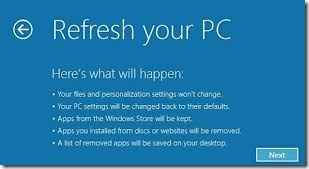
Windows 8 ရဲ  ့ feature အသစ္တစ္ခု ျဖစ္တဲ့ Refresh And Reset  အေၾကာင္းေရးေပးခဲ့ျပီးပါျပီ။Windows 8 မွာ Refresh လုပ္ရင္ သင့္ရဲ  ့ဖုိင္ေတြ ၊ Windows Store ကေန အင္စေတာလုပ္ထားတဲ့ applications ေတြမပ်က္ဆီးဘဲ ရွိေနမွာျဖစ္ေပမယ့္ Windows store ကေန install လုပ္ထားတာမဟုတ္တဲ့ applications ေတြအားလံုးကို ဖ်က္ပစ္မွာပါ။Windows store ကေန အင္စေတာလုပ္ထားတာမဟုတ္တဲ့ applications ေတြကို မပ်က္ဆီးဘဲ refresh လုပ္ႏိုင္ဖို ့custom refresh image ကို္ျပဳလုပ္ျပီးအသံုးျပဳႏိုင္ပါတယ္။

Create A Custom Refresh Image

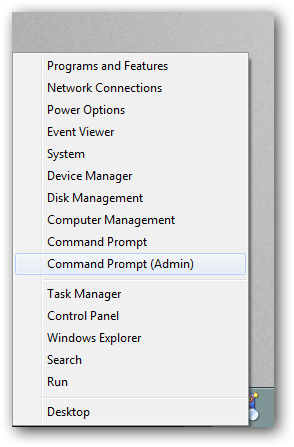
WinX menu (Win+X) ကို ႏွိပ္ျပီး command prompt(admin) ကို ႏွိပ္ပါ။
2

Refresh images ေတြကို သီးသန္ ့ဖုိဒါတစ္ခုမွာသိမ္းဖို ့အတြက္ C: ေအာက္မွာ CustomRefreshImages ဆိုတဲ့ ဖိုဒါတစ္ခု အရင္ျပဳလုပ္ထားပါ။ျပီးရင္ Command Prompt မွာ ေအာက္က command ကို ရိုက္ပါ။ Image1 နာမည္အစားသင္ၾကိဳက္ႏွစ္သက္ရာနာမည္ေပးႏိုင္ပါတယ္။ေနာက္ျပီး ၾကိဳက္ႏွစ္သက္သေလာက္ custom fresh image ေတြျပဳလုပ္ႏိုင္ျပီး ၾကိဳက္ႏွစ္သက္ရာ image ကို အသံုးျပဳျပီး refresh လုပ္ႏိုင္ပါတယ္။”Recovery image creation and registration completed successfully” ဆိုတဲ့ message ေပၚလာရင္ custom refresh image ျပဳလုပ္တာျပီးဆံုးပါျပီ။

recimg /createimage C:\CustomRefreshImages\Image1
3

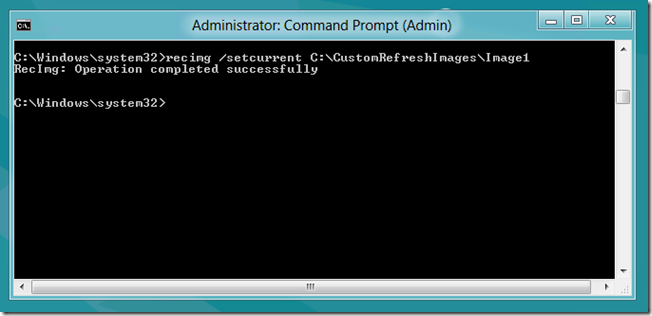
Custom image ေတြတစ္ခုထက္ပို ျပဳလုပ္ထားရင္ေတာ့ ေနာက္ဆံုးျပဳလုပ္ထားတဲ့ image က current image ျဖစ္ေနမွာျဖစ္ျပီး refresh လုပ္တဲ့အခ်ိန္မွာ အဲဒီ image ကို အသံုးျပဳမွာပါ။တစ္ျခား image ေတြကို current image အျဖစ္သတ္မွတ္ဖို ့ေအာက္က command ကို သံုးပါ။Image1 ေနရာမွာ current image အျဖစ္သံုးမယ့္ image ရဲ ့နာမည္ကို ရိုက္ပါ။

recimg /setcurrent C:\CustomRefreshImages\Image1

5

Current refresh image ကို သိရွိႏိုင္ဖို ့အတြက္ ေအာက္က command ကို သံုးႏိုင္ပါတယ္။
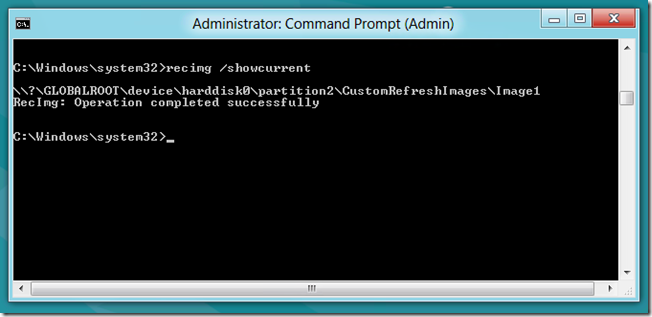
recimg /showcurrent

6

Custom refresh image ကို အသံုးမျပဳခ်င္ေတာ့ဘဲ default အတိုင္းပဲထားခ်င္ရင္ေတာ့ေအာက္က command ကို သံုးပါ။
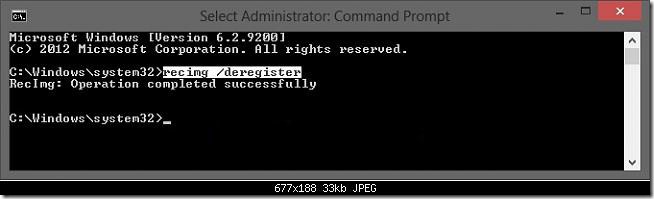
recimg /deregister

1


www.kothuya.com

Facebook Page ကို Like ျပီးအားေပးပါအံုး

ေဒါင္းနည္းမ်ားမသိပါက ဒီမွာ သြားၾကည့္ေပးပါခင္ဗ်ာ

Monday, February 4, 2013

Disable User Account Control Prompt In Windows 8

ashampoo

Windows 8 မွာ သင္အသံုးျပဳေနက် applications ေတြကို အသံုးျပဳတိုင္း user account control ေပၚလာလို ့အလုပ္ရွုပ္ရင္ မေပၚေအာင္ေဖ်ာက္ႏိုင္ပါတယ္။ဒီလို လုပ္ဖို ့အတြက္ Admin account နဲ ့ Windows 8 ကို ၀င္ျပီး Charms Bar (Win + C) ကို ုသြားျပီး Search ကို ႏွိပ္ျပီး search box ကေန uac လို ့ရိုက္ပါ။ျပီးရင္ Setting ကို ႏွိပ္ျပီး  “Change User Account Control settings” ကို ႏွိပ္ပါ။